
Software Maintenance Costs After Launch
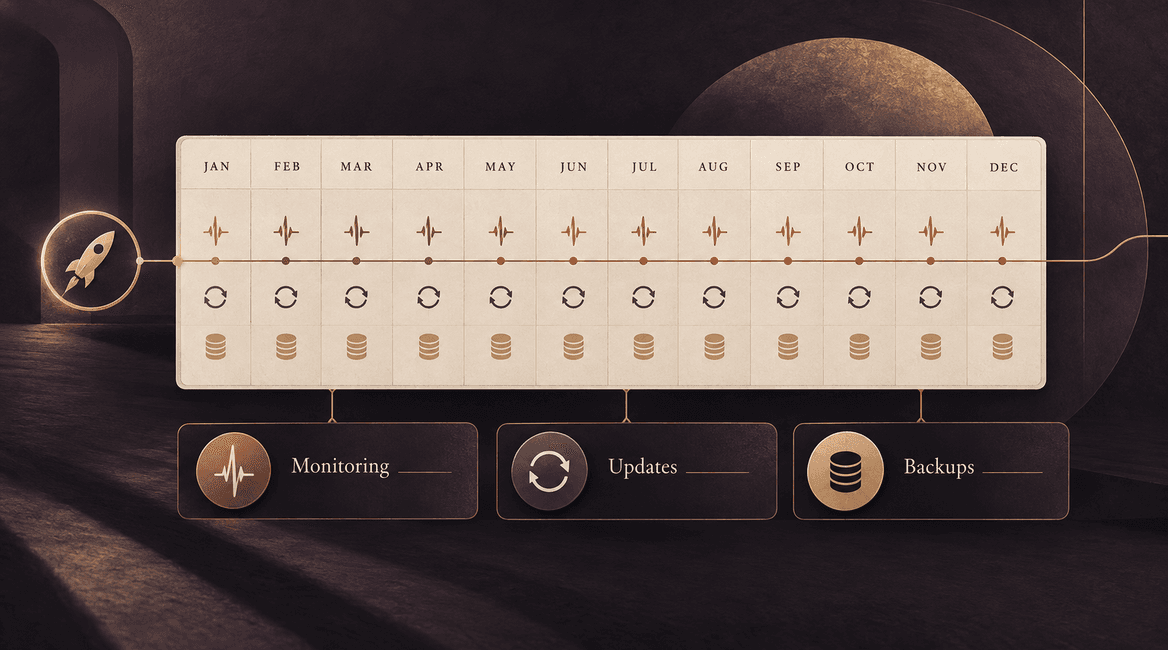
Software maintenance costs begin when the product becomes something people depend on. Even an application with a stable feature set needs a place to run, someone to watch for problems, updates to its dependencies, and a plan for support and recovery.
Budget for those responsibilities before launch. Separate the services that keep the current product operating from the improvements you may choose to build later. This makes proposals easier to compare and prevents a vague “support included” promise from carrying more meaning than the agreement supports.
A post-launch budget should name the services, the responsibilities, and the conditions that can change the cost.

What Belongs in a Software Maintenance Budget?
Hosting, databases, storage, and traffic
List the services required to operate the application: hosting, the database, file storage, content delivery where used, domains, and any separate test environment. Identify who owns each account and who pays the bill.
Some charges are relatively predictable; others depend on usage, retained data, or traffic. Build estimates from the actual architecture and current provider plans. A small customer portal storing documents has a different usage pattern from a platform processing large files or frequent background jobs.
Monitoring and incident response
Monitoring should help someone notice when the product is not doing its job. That can include availability, errors, failed background work, and important business flows such as a submitted request reaching staff. A green server status does not prove the entire customer journey works.
Decide who receives alerts, when they are available, and what they do next. A monitoring subscription alone does not provide an engineer to investigate. Clarify response targets, escalation contacts, and how urgent issues are handled outside normal working hours.
Backups and recovery checks
Specify what is backed up, how often, how long copies are retained, and who can restore them. Include files and configuration where necessary, not only database records. Decide how much recent work the business could tolerate losing and how long an interruption could reasonably last.
Budget for checking that recovery works. A successful backup notification is not the same as a demonstrated restore. Keep recovery instructions and access available to the responsible people, and revisit the plan when the application's data or dependencies change.
Dependency updates and compatibility
Applications depend on frameworks, libraries, operating environments, and external services. Updates can address defects, security issues, or compatibility changes. The effort includes reviewing the change, applying it, testing relevant workflows, and deploying it safely.
Agree on a routine update schedule and a separate process for urgent issues. An update that affects authentication or payments may need more careful checking than a minor interface change. Avoid assuming that automatic update tools replace evaluation and testing.
Bug fixes, support, and delivery defects
Ask how the agreement distinguishes a defect in delivered work, a later compatibility issue, a support request, and a new feature. A defect-correction period may have specific limits. Ongoing support may be billed hourly, through a retainer, or under another arrangement.
Define how issues are reported and prioritized. Include the information needed to investigate: affected workflow, time, expected behavior, and a safe example. Clarify whether the quoted response means acknowledgment, investigation, a workaround, or resolution. Those are different commitments.
Third-party subscriptions and usage
Email, messaging, maps, payments, search, AI services, and other integrations can add recurring charges. List the billing unit for each: per seat, per request, per message, storage, transaction, or a combination. Check current provider terms rather than treating an introductory tier as a permanent price.
Assign someone to watch usage and billing alerts. A new campaign or workflow can increase costs even without a change to the application itself. Include the work required if a provider changes its API, retires a feature, or becomes unsuitable for the business.
Account access, documentation, and handover
Keep a current record of environments, accounts, deployment steps, key integrations, and support contacts. Your business should know how to regain access and who can authorize changes. Review access when staff or vendors leave.
Budget for maintaining those materials as the system changes. Documentation written once at launch can become misleading if nobody updates it. A future developer should be able to understand the product's operation without relying entirely on the original team's memory.
Future improvements belong in a separate budget
A new customer role, reporting module, or integration changes what the product does. Track that work separately from maintaining the agreed behavior. Otherwise an improvement request can consume the resources intended for essential upkeep.
Maintain a prioritized list and review it with the business owner. Some requests may reduce future support effort, but they still need a scope and an estimate. Distinguishing the categories makes tradeoffs visible instead of making every request feel like an unexpected support bill.
Build a budget with fixed, variable, and planned components
Create a worksheet with each service or responsibility, its owner, billing unit, expected usage, review date, and source for the estimate. Use three groups: recurring baseline costs, usage-dependent costs, and planned work. Keep a separate allowance for identified uncertainty.
For a hypothetical portal, an illustrative monthly calculation could be $120 for hosting and data services, $40 for communications and monitoring tools, and 6 planned maintenance hours at an assumed $100 per hour. That totals $760 for the stated items. These are invented arithmetic inputs, not current provider prices, a typical market budget, or DevConex rates.
Replace those inputs with your actual quotes and usage assumptions. Add items the example does not include, such as larger storage, special coverage, recovery exercises, taxes where applicable, or feature development. Also review annual charges and irregular work so a monthly total does not conceal them.
Questions to Settle Before Launch
- Who owns and pays for hosting, domains, databases, and third-party accounts?
- Which costs are fixed, usage-based, annual, or charged as engineering time?
- Who receives alerts, and what coverage and response expectations apply?
- What is backed up, and when will a restore be checked?
- Who reviews updates and tests the affected workflows?
- What counts as a delivery defect, maintenance task, support request, or new feature?
- How are urgent work and spending beyond the agreement approved?
- Who maintains documentation, access records, and the improvement backlog?
Review the Budget Against Actual Use
After launch, compare invoices, usage, support requests, and maintenance work with the assumptions. Investigate unexpected changes and update the plan when the product's role expands. A system used for an occasional internal task has different coverage needs from one that supports time-sensitive daily operations.
Ask potential partners to describe the ongoing responsibilities as clearly as the initial build. Our software development company checklist includes questions about support and handover. Discuss your application's post-launch needs with DevConex to identify the work and ownership your plan should address.
FAQs
Can maintenance be estimated as a percentage of development cost?
A percentage may be a rough planning shortcut, but it does not explain the work. Use actual services, coverage, update needs, usage, and planned engineering effort for a budget you can review. Two products with similar build costs can have very different operating needs.
Is hosting the same as maintenance?
No. Hosting provides infrastructure for the application. Maintenance includes responsibilities such as updates, investigation, testing, and recovery planning. A hosting provider's service does not automatically cover custom application issues.
Do we need a monthly retainer?
That depends on required availability and recurring work. A retainer can reserve capacity or define coverage; an hourly arrangement may fit less time-sensitive work. Compare scope, availability, unused capacity rules, exclusions, and approval requirements.
Can another developer maintain the software later?
Yes, when the technology, documentation, access, and ownership arrangements support a handover. Plan for onboarding effort and ask for current deployment instructions, a list of services, known issues, and access under accounts your business controls.