

How to Add Secure File Uploads to a Web App
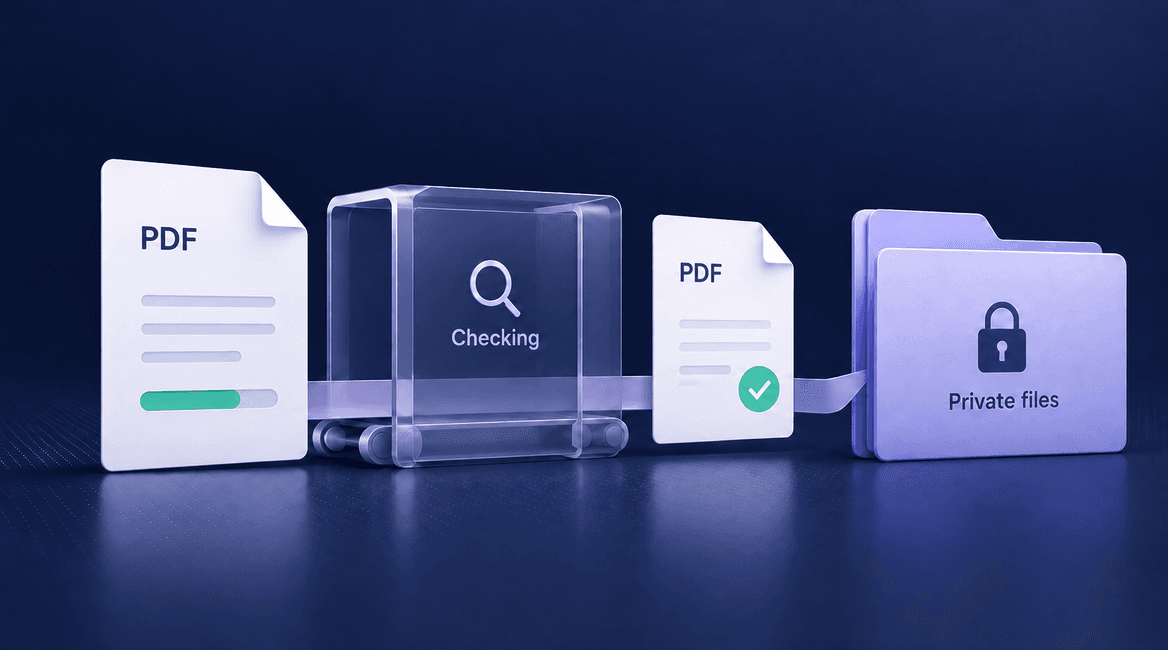
A customer uploads a PDF to support a service request. Staff need to open it, the customer needs to see whether it was accepted, and other customers must not be able to retrieve it. Those requirements extend well beyond adding a file input to a form.
This guide uses a private PDF workflow to explain upload authorization, object storage, validation, downloads, and recovery. The same lifecycle can support photos or attachments, but allowed formats and processing controls should match the files your product actually needs.
An uploaded file is received data, not yet a document your application should trust.

Design the Entire File Lifecycle
Define a small, explicit file contract
Specify the accepted formats, maximum size, number of attachments, intended readers, retention period, and replacement behavior. In our example, a customer may attach a PDF to a request they own. The file remains private and is unavailable for download until required checks finish.
Start with the minimum formats necessary. Supporting arbitrary archives, editable office documents, images, and executable content introduces different processing requirements. State what users should do when a file is rejected, and provide useful feedback before they spend time uploading it.
The OWASP file-upload guidance recommends layered controls: allowed types, size limits, generated filenames, authorization, protected storage, and appropriate content checks. Neither a filename extension nor a browser-provided content type proves what the file contains.
Create an upload record before accepting bytes
When a customer requests an upload, the backend authenticates them and checks their right to attach a document to that specific service request. It then creates an upload record with a generated identifier, owner, parent request, expected constraints, storage location, and an initial pending state.
Generate the storage object key on the server. Treat the user's original filename as display metadata, sanitize it appropriately, and do not use it to choose an arbitrary storage path. Two people uploading “document.pdf” should not overwrite one another's files.
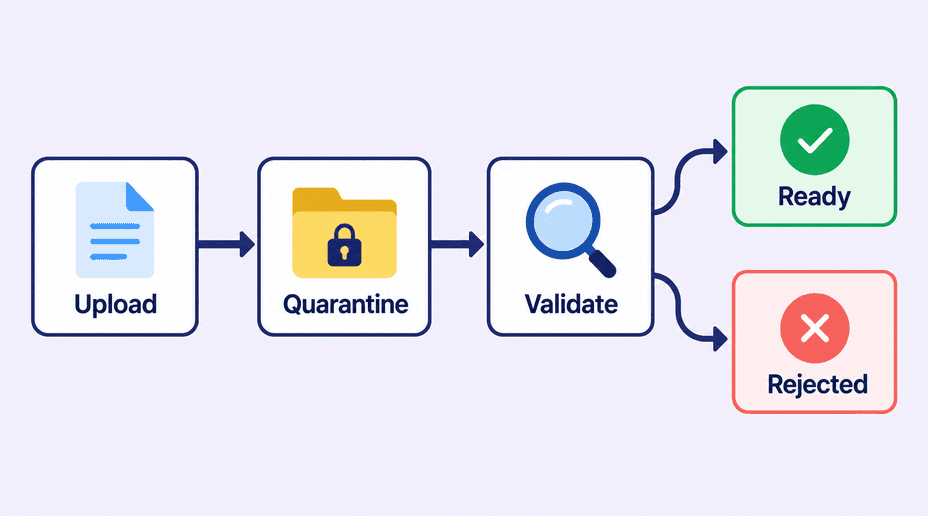
For this example, the state sequence is pending, uploaded, checking, and ready or rejected. Keep the storage object separate from the application's declaration that a document is usable. This distinction makes failures and user messaging much easier to handle.
Choose whether bytes pass through your server
For small uploads, accepting the file through your backend can be straightforward, provided you enforce streaming and request-size limits. For larger files, direct-to-storage uploads can avoid routing all file bytes through an application server. The backend still authorizes the operation and controls the destination.
With Amazon S3, a presigned URL can authorize a particular upload without giving the browser AWS credentials. It is a temporary capability, not a general login or proof that a file is safe. S3 also documents that uploading to an existing key can replace that object. AWS's upload guide explains the mechanism.
Use a short, practical expiry and a new object identity for each upload attempt or version. Avoid logging signed URLs or exposing them in analytics. Configure cross-origin access for the intended frontend, while remembering that CORS is not an authorization boundary for non-browser clients.
Enforce upload limits where they can actually be enforced
A browser size check helps the user, but a direct HTTP client can bypass it. Apply limits at the backend or storage-upload mechanism as appropriate. A presigned PUT URL alone is not a universal file-size policy. Where using an S3 POST policy, explicit conditions can restrict fields and content length. See the S3 POST policy reference.
After transfer, verify the stored object and its size against the pending upload record before accepting completion. Use rate limits and per-account quotas to prevent many individually allowed files from exhausting storage or processing capacity. Limit expensive operations, including parsing and preview generation, separately from the transfer itself.
Do not rely on a client callback saying “upload finished.” The backend should confirm that the expected object exists and is the intended version. A forged completion request must not attach an arbitrary object to another customer's record.
Quarantine first, then inspect the actual content
Store new bytes in a private quarantine location or an equivalent state that the download path cannot serve. Identify the file format from the content using maintained tools. Enforce the supported document rules and perform malware scanning or content disarm where the workflow requires it. No single check guarantees that a file is harmless.
For a PDF workflow, decide whether encrypted documents or unsupported features can be processed. Treat an inconclusive or failed scan as requiring review or rejection, not as a clean result. Run parsers with bounded time and memory, and keep processing components updated.
Tie validation to an immutable object version or promote the checked bytes to a fresh private object the customer cannot overwrite. Otherwise, a still-valid upload URL could replace an object after it was scanned. Mark the application record ready only for the exact bytes that passed the required checks.
Authorize every download request
A private bucket is useful only if the application also controls how access is granted. When staff or a customer requests a download, look up the file record, check its ready state, and verify that the requester may access its parent service request. Knowing the object ID should not be enough.
The backend can then stream the file or issue a short-lived signed download URL. Anyone who obtains a usable signed URL may exercise that capability until it expires or otherwise becomes invalid. Choose expiration and delivery behavior with that fact in mind; removing an app permission is not necessarily immediate revocation of an already-issued URL.
Use an appropriate content type and download disposition. Avoid displaying arbitrary uploaded HTML or active content within your application's trusted origin. A document previewer needs its own isolation and maintenance rather than inheriting the assumption that every uploaded file is safe to render.
Make interrupted uploads and replacements understandable
If the connection fails, keep the upload pending or failed and offer a defined retry path. Do not show “document submitted” merely because the user selected a file. A completed transfer awaiting checks should say that it is being checked, with an appropriate recovery path if processing stalls.
For replacements, upload and validate the new version before switching the application's active reference. Preserve the old usable document if the new one fails. Retire the old object according to retention rules after the switch, rather than deleting it at the start of the replacement attempt.
For multipart uploads, track unfinished sessions and clean them up. AWS supports lifecycle cleanup of incomplete multipart uploads; configure and test it against the intended workflow. AWS lifecycle guidance describes that mechanism.
Secure Upload Checklist
- Define formats, size limits, readers, retention, and replacement rules.
- Authorize the specific parent record before creating an upload destination.
- Generate object keys server-side and keep original names as metadata.
- Enforce transfer limits, quotas, and bounded processing.
- Keep new files private until required checks pass.
- Bind validation to the exact object version or immutable promoted copy.
- Authorize downloads against current application permissions.
- Test interrupted transfers, rejected files, cleanup, and failed replacements.
Walk Through a Private Document Upload
Customer A opens their own service request and selects a PDF. The application creates pending upload U-42 and returns a limited upload capability for its generated quarantine key. The browser transfers the file and requests completion. The backend checks the stored object and schedules inspection.
While inspection runs, the interface shows “Checking document.” The worker validates the file against the agreed rules and either records a rejection reason or promotes the accepted version to private ready storage. Only then does the service request display the document as available to authorized readers.
A staff member clicks Download. The backend checks the staff member's current access to that request and the file's ready state, then provides controlled access. Customer B trying the same document identifier receives no file. The lifecycle makes both the happy path and the denied path explicit.
Test the Cases a File Picker Does Not Reveal
Wrong content and excessive size
Upload a file whose extension disagrees with its contents, an unsupported format, and a file over the agreed limit. Expect rejection without publishing or marking the document ready. Use safe test fixtures; do not introduce live malware into a shared environment.
Unauthorized upload and download
Use a second test customer to request an upload destination for Customer A's service request and to request A's download. Both should be denied. Repeat while signed out and after removing a test staff member's access. Also confirm that the storage object has no unintended public access path.
Expiry, retry, and stalled processing
Let an upload URL expire before using it. Interrupt a transfer, retry a completion callback, and stop the inspection worker. Expect clear statuses, no duplicate attachment records, and monitoring for stalled work. The design should distinguish retryable failure from a rejected document.
Replacement and cleanup
Upload a valid replacement, then repeat with one that fails validation. Confirm that the active document changes only after acceptance. Check cleanup of abandoned objects without deleting active documents. Keep enough operational records to explain which object belongs to which request and why it was removed.
FAQs
Is a private storage bucket enough?
It is one layer. The application still needs upload authorization, content validation, controlled downloads, and rules for the stored files' lifecycle. Incorrectly issuing a signed URL can expose a private object.
Are signed upload links single-use?
Do not assume that they are. Their reuse behavior depends on the storage mechanism and conditions. Use unique destinations and version-aware validation; do not treat expiration as proof that an object could not have changed earlier.
Should every document be scanned?
Choose controls based on the formats, readers, and consequences involved. Private customer documents opened by staff generally warrant content inspection appropriate to the risk. A scan result is one input, not a guarantee of safety.
Can we use Supabase Storage instead of S3?
Yes. The storage-specific APIs and policies differ, but the application still needs authorization, accepted-file rules, processing states, and recovery. Our Supabase responsibility guide explains the broader platform boundary.
File handling deserves the same care as other customer-facing workflows. DevConex can help scope storage, validation, and access together. Discuss your application's upload requirements before a simple attachment feature becomes an operational blind spot.