
User Acceptance Testing Checklist Before Launch
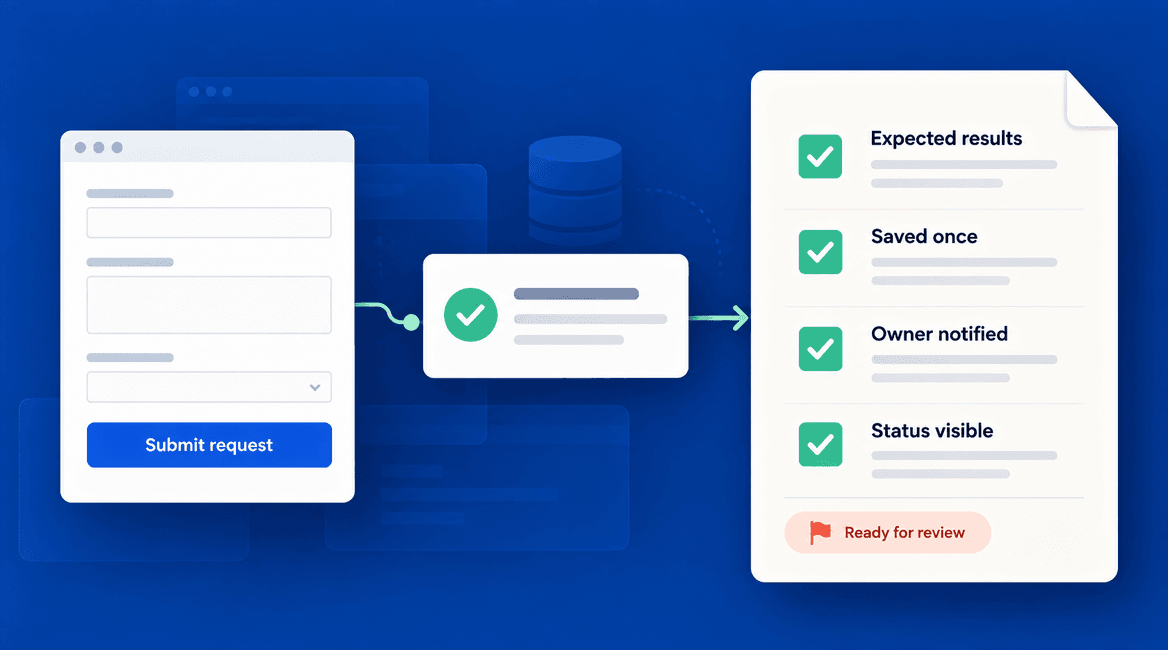
The demonstration went well. The screens looked finished, the developer completed the main workflow, and everyone agreed the product was nearly ready. Then a staff member tried an ordinary task with a different account and could not complete it.
User acceptance testing, or UAT, gives the people who will use or own the software a structured way to check whether it supports their real work. It turns “looks good” into specific evidence: which tasks were tested, what happened, what remains unresolved, and who is prepared to accept the result.
This guide explains how a business owner can organize that process without becoming a software tester. It includes worked examples, an issue-report format, and a checklist you can use before a launch or a significant update.
Approve the behavior your team has checked, not just the screens it has seen in a demonstration.

What User Acceptance Testing Should Establish
Understand what UAT covers
UAT focuses on whether intended users can complete the agreed business tasks in a realistic setting. The development team should also carry out the technical checks appropriate to the product. User review does not replace testing of code, integrations, security, performance, or recovery.
Acceptance work is collaborative. The ISTQB acceptance-testing overview emphasizes cooperation between business stakeholders and testers, including defining acceptance criteria during requirements work. For a small project, that can mean a business owner, one or two representative users, and the delivery team agreeing on observable results before development is finished.
Name the testers and the decision owner
Include people who understand the work and will notice when a workflow is technically possible but operationally awkward. If a system serves customers, coordinators, and managers, cover those roles. Do not rely entirely on the project sponsor's account, which may have broader access than ordinary users.
Assign someone to organize testing, consolidate issues, and track retests. Separately identify who can approve the release and who can accept an unresolved limitation. Those roles can be held by the same person in a small business, but the responsibilities should be explicit.
Agree on what is ready to test
Ask for a clearly identified version in a suitable test environment, a list of included features, known limitations, and the accounts and data needed for the scenarios. If a workflow is incomplete, mark the related tests as blocked rather than recording them as passed because the screen exists.
Use representative test data with appropriate privacy protections. Confirm that test emails, messages, payments, or integrations will not accidentally affect real customers or operations. Keep the environment sufficiently close to the planned release to make the results meaningful, and document any important differences.
Turn requirements into observable scenarios
Start with complete tasks, not a tour of every button. For a service-request application, a customer submits a request, a coordinator receives it, staff change its status, and the customer sees the update. That journey crosses roles and screens, which is where missed assumptions often become visible.
For each scenario, record the user's role, starting conditions, actions, expected result, actual result, and outcome. “The request page works” is too vague. “One request is saved, the coordinator can find it, and the customer receives an accurate acknowledgment” provides something the team can check.
Include ordinary exceptions and access boundaries
Test more than the easiest route. Consider missing information, duplicate actions, unavailable integrations, expired sessions, canceled work, and people with different permissions. Choose scenarios based on the actual process and the consequences of failure, rather than trying to invent every possible edge case.
For a customer system, include an authorized test that one customer's account cannot view another customer's records. For a staff tool, confirm that a regular user cannot perform manager-only actions. These checks complement the developers' security testing; they are not a substitute for it.
Write issue reports that someone can act on
A useful issue report identifies the tested version, role, starting conditions, exact steps, expected result, actual result, and business impact. Attach a screenshot or short recording when it helps, with private information removed. Link the issue to the failed test so the eventual correction can be verified.
Compare “The form is broken” with: “In the test environment, a customer submits a complete request, then clicks again while waiting. Two requests appear in the coordinator's queue. We expected one request because the customer intended a single submission.” The second report gives the team a reproducible scenario and explains why it matters.
Separate defects from new requests
A defect is a failure to meet agreed behavior. A change request asks for behavior beyond that agreement. If the distinction is unclear, review the requirement and the user's underlying need together. Do not assume every inconvenient interaction is automatically extra scope, or that every new idea must be fixed before launch.
Keep defects and improvement ideas visible in separate lists. For each issue, record impact and urgency. A minor alignment problem and a failure to retain customer requests should not have equal influence on a launch decision merely because each is one item in a tracker.
Retest fixes and check related behavior
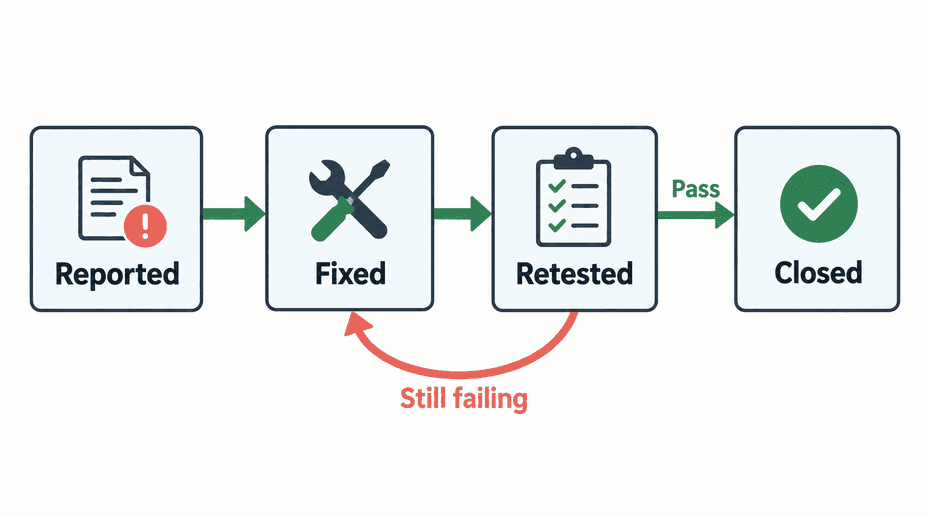
When the team reports a correction, rerun the failed scenario on the updated version and record the result. Do not close the issue solely because the developer marked it fixed. If it still fails, add the new evidence and return it for investigation.
Ask the team which related workflows could be affected by the change. A correction to request submission might also affect validation, notifications, or how returning customers are identified. Agree on the appropriate regression checks, then record which version actually passed.
Decide the acceptance rules before the last meeting
Define what must pass, which issues prevent launch, and how lower-impact limitations can be considered. A high overall pass percentage is not sufficient if the failed scenario is the product's essential task. Treat tests that were never run as untested, not successful.
If you accept a nonblocking limitation, record the affected users, practical workaround, responsible owner, and plan for resolution. Serious access-control failures, data loss, or an unusable core workflow need resolution before exposing users to the affected functionality. Do not let a launch date quietly redefine the acceptance criteria.
User Acceptance Testing Checklist
- Agree on the business workflows and observable acceptance criteria.
- Assign representative testers, a testing coordinator, and a release decision owner.
- Identify the version, environment, known limitations, test accounts, and test data.
- Confirm that testing will not trigger unintended real-world actions.
- Cover complete journeys, relevant user roles, and important exception paths.
- Record expected results, actual results, and pass, fail, or blocked outcomes.
- Report reproducible defects separately from proposed new features.
- Retest corrections and complete the related regression checks.
- Review every unresolved issue and every important scenario not yet tested.
- Record acceptance of a specific version and complete operational launch checks separately.
Three Worked UAT Scenarios
These examples use a hypothetical service-request application. Replace the roles and expected behavior with your own agreed requirements. They demonstrate a test format, not a complete test plan for every product.
Scenario 1: Submit a valid request
Starting conditions: a test customer is signed in and has access to the request form. The coordinator's test account can receive requests. Required fields and the acknowledgment behavior have been agreed.
Actions: enter valid request details and submit once. Open the customer's request list, then check the coordinator's queue using the appropriate staff account.
Expected result: one request is saved with the submitted information. The customer sees the correct initial status. The coordinator can find and act on that same request. The agreed acknowledgment is delivered to the test destination. Record the actual result for each part rather than treating the confirmation screen alone as a pass.
Scenario 2: Correct missing information
Starting conditions: the test customer is on the request form, and one field is required by the agreed rules.
Actions: leave that field empty, complete the other fields, and attempt submission. Read the feedback, provide the missing value, and submit again.
Expected result: the application clearly identifies the missing information, retains the other valid entries, and does not create an incomplete request. After correction, one complete request is created. This checks recovery from an ordinary mistake, not only validation in isolation.
Scenario 3: Protect another customer's record
Starting conditions: two test customer accounts belong to different organizations. Each has its own request, and the test team is authorized to check the access boundary.
Actions: while signed in as Customer A, attempt to open the direct link to Customer B's test request. Also check that Customer B's record does not appear in Customer A's normal list or search results.
Expected result: the application does not expose Customer B's request or private details to Customer A. Customer A can still use their own permitted records. Record any unexpected exposure immediately and involve the delivery team before continuing with affected functionality.
Acceptance Is One Part of Launch Readiness
Even a successful UAT round does not answer every operational question. Confirm deployment responsibilities, backup and recovery arrangements, monitoring, account ownership, staff training, and support contacts through a separate launch review. Decide who checks the key workflows immediately after deployment and what happens if they fail.
Keep the acceptance record short and specific: tested version, completed scenarios, unresolved items, decision, and decision owner. If important functionality changes afterward, assess which scenarios need another run rather than assuming the old result still applies.
DevConex helps businesses define what successful delivery should look like before development begins. Share your software project and launch goals to discuss acceptance criteria, the review process, and what “done” should mean for your team.
FAQs
Who should perform user acceptance testing?
People who understand the business process and represent the intended users should participate, with the delivery team providing the environment, explanations, and technical support. The business should name who makes the acceptance decision.
When should we start planning UAT?
Define acceptance criteria while requirements are being discussed. Prepare scenarios as workflows become clear and review usable increments during development. Waiting until the final week leaves less time to resolve misunderstandings.
Does every issue have to be fixed before launch?
Use the agreed acceptance rules and the consequences of each issue. Critical workflows and protections must work. A low-impact limitation may be acceptable when its effect, workaround, owner, and resolution plan are explicitly understood. A blanket pass percentage is not enough.
What if a fix changes something that already passed?
Repeat the affected checks on the new version. Ask the team to identify related behavior and regression coverage. Acceptance evidence belongs to the version tested, not to the project forever.
Does signing off mean the software has no defects?
No. It records an acceptance decision based on the agreed scope, completed checks, and known limitations. Keep support, reporting, and maintenance arrangements in place for issues discovered after release.