
When to Replace Spreadsheets With Custom Software
Replacing spreadsheets with custom software makes sense when the way work moves through your business has outgrown what the current setup can reliably support. A large workbook alone is not enough reason to commission an application.
Look at the repeated problems: people re-enter information, copy files to manage access, reconcile conflicting versions, or wait for one person to produce a report. Then compare improving the spreadsheet, adopting an existing product, and building software around the workflow.
Replace the fragile process only after you understand it; copying every spreadsheet column into an app will not fix the workflow.

Look for Operational Problems, Not Just a Big Workbook
Duplicate entry has become part of the normal process
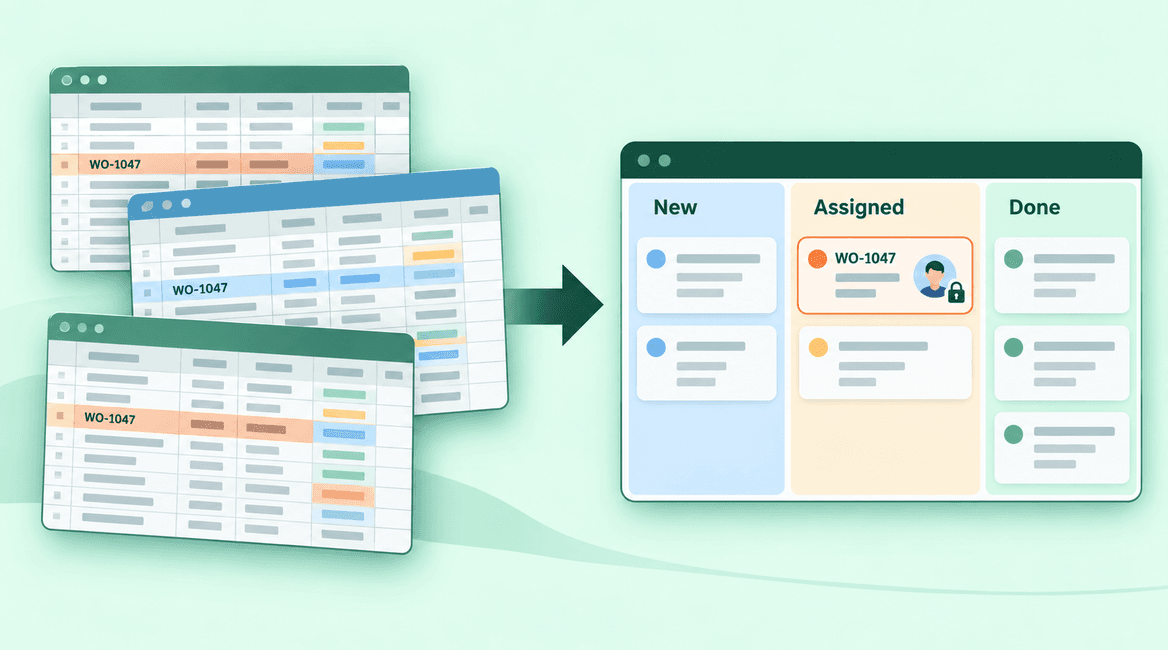
A hypothetical maintenance company records each job in an intake sheet, copies it into a scheduling sheet, and later enters the result into a reporting workbook. When a customer changes the address, someone must remember every copy.
Trace one job through those steps. Record where the information changes, who updates it, and which version is authoritative. If a shared sheet, form, or supported integration can remove the duplication, try that before assuming a custom application is required.
Permissions depend on sending different copies
You may need office staff to see all jobs, contractors to see only assigned work, and customers to see their own requests. If the current process handles that by emailing filtered copies, keeping information current and access appropriate becomes harder.
Document who can view, edit, approve, and export each kind of information. Some spreadsheet platforms provide useful sharing controls, but hidden rows or tabs should not be treated as a reliable substitute for the required access model. Test the actual permissions available in your setup.
Errors are difficult to detect and explain
Overwritten formulas, inconsistent statuses, and missing required fields can make a workbook unreliable. Count the actual incidents and their consequences. A single formula mistake that was easy to fix is different from recurring errors that cause missed jobs or incorrect decisions.
Software can enforce rules and record changes, but only if those behaviors are designed into it. Specify allowed transitions, validation, correction permissions, and history requirements. An application that accepts the same inconsistent data may simply hide the problem behind a cleaner screen.
Reporting requires a recurring cleanup exercise
If a manager spends every Friday merging sheets and interpreting different status labels, the reporting problem may begin with how records are entered. Agree on definitions such as “scheduled,” “completed,” and “canceled” before designing a dashboard.
Try standardizing fields and report definitions first. When reporting must combine several systems or reflect a controlled live process, a database-backed workflow or integration may become useful. Decide which reports inform an actual decision and who will check their accuracy.
Work gets stuck between people
A spreadsheet can show a status without making it clear who should act next. Staff may rely on separate messages to explain that a job needs approval, a customer is waiting, or a document is missing.
Map the handoffs: what triggers each step, who owns it, when it is due, and what happens if nobody responds. An existing task or workflow product may already support that process. Custom software is more relevant when the handoffs depend on unusual rules or several systems that need to stay consistent.
One person has become the operating manual
If only one employee understands the formulas, imports, and monthly cleanup, the process has a continuity risk. Start by documenting it and arranging a backup owner. That work helps immediately and will be necessary for any migration.
Do not expect developers to infer every business rule from the workbook. Review formulas, exceptions, hidden assumptions, and manual corrections with the people who use it. Often the real process differs from what the sheet appears to describe.
Know when a better spreadsheet is sufficient
Keep or improve the spreadsheet when the workflow is straightforward, the number of editors is manageable, access requirements are simple, and mistakes are easy to identify and correct. Templates, data validation, protected formulas, a clear owner, and a consistent shared location may solve the practical problem.
A small experiment is useful: standardize the sheet, remove duplicate copies, and observe whether the recurring issues decline. If the process becomes dependable, custom development may not be justified. Review it again when requirements or volume change.
Compare buying before building
For standard scheduling, inventory, job tracking, or customer records, evaluate existing products using your own examples. Ask staff to complete real tasks, including corrections and unusual cases. Look for configuration and supported integrations before planning a replacement system.
A custom application may fit when the important gaps are specific, repeated, and expensive enough to justify implementation and maintenance. State those gaps clearly. “We need an app” is less useful than “contractors need restricted access to assigned jobs while the office retains a complete change history.”
Plan a controlled migration
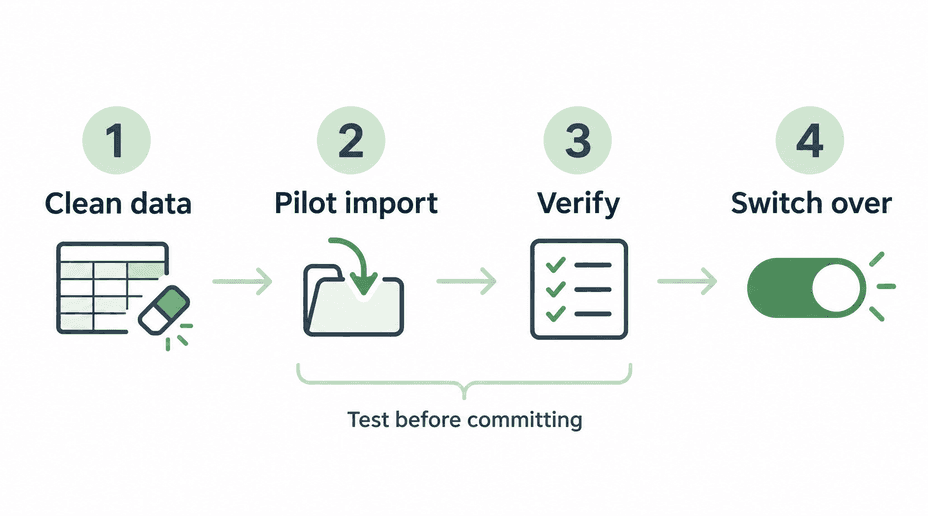
Choose the authoritative source, remove duplicates, standardize values, and decide which history must be retained. Map columns to the new records and relationships. Back up the original files and perform a pilot import using representative data, including unusual and incomplete records.
Verify counts, key totals, ownership, attachments, permissions, and real user journeys. Agree on a cutover date and who resolves discrepancies. If you run both systems temporarily, define which one receives new entries and how changes are reconciled; two competing sources of truth create new confusion.
Train staff on tasks rather than only showing the interface. Keep a practical recovery plan and decide how long the original files remain available in a controlled archive. The migration is complete when the team can perform the work and trust the records.
A Spreadsheet Replacement Readiness Checklist
- Trace one record through every copy, handoff, and reporting step.
- Record recurring errors and manual effort using actual examples.
- Define authoritative fields, statuses, and business rules.
- Write the required view, edit, approval, and export permissions.
- Try reasonable spreadsheet improvements and relevant existing products.
- Identify the specific gaps that justify custom development.
- Plan cleanup, field mapping, a pilot import, and data verification.
- Assign cutover, training, support, and long-term ownership.
Make the Business Case From the Work
Estimate the current effort using observed tasks and realistic volume. Include rework and delays, but avoid treating every saved minute as guaranteed cash savings. Compare that with implementation, training, subscriptions, maintenance, and internal ownership for the proposed solution.
DevConex can help assess a spreadsheet-driven process and the options for improving it. Describe where duplicate work or missed handoffs occur. A sample workflow with sensitive details removed is often a better starting point than a long list of proposed screens.
FAQs
How many rows mean we need custom software?
There is no universal row count. Reliability, permissions, relationships between records, collaboration, and process complexity matter more than a single size threshold. Evaluate the tasks and limitations in your actual setup.
Can we keep exporting to spreadsheets?
Yes, if exports are included in the scope. Decide whether they are read-only reports, working copies, or inputs that will be imported again. Define reconciliation rules if edited exports can change the main system.
Should we migrate every historical record?
Not automatically. Identify operational and retention needs, data quality, and the cost of making old records usable. Some history may belong in a controlled archive rather than the active workflow.
Will custom software eliminate mistakes?
No. It can prevent defined errors and make changes easier to trace, but people can still enter incorrect information and software can contain defects. Include validation, review, testing, and a practical correction process.