
How to Integrate AI Into an Existing App
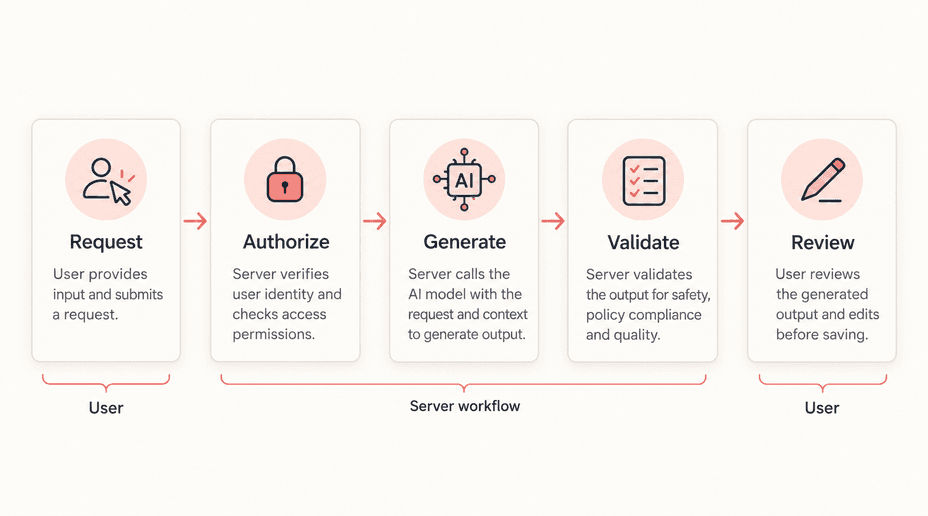
Integrating AI into an existing app starts with a workflow, not a chat window. A useful feature might summarize a long case history, extract fields from an uploaded document, or help a user search a collection they already have permission to view.
The challenge is fitting an uncertain output into software that users expect to behave predictably. Your app must still enforce access, preserve correct records, handle delays, and explain what happened when a request fails.
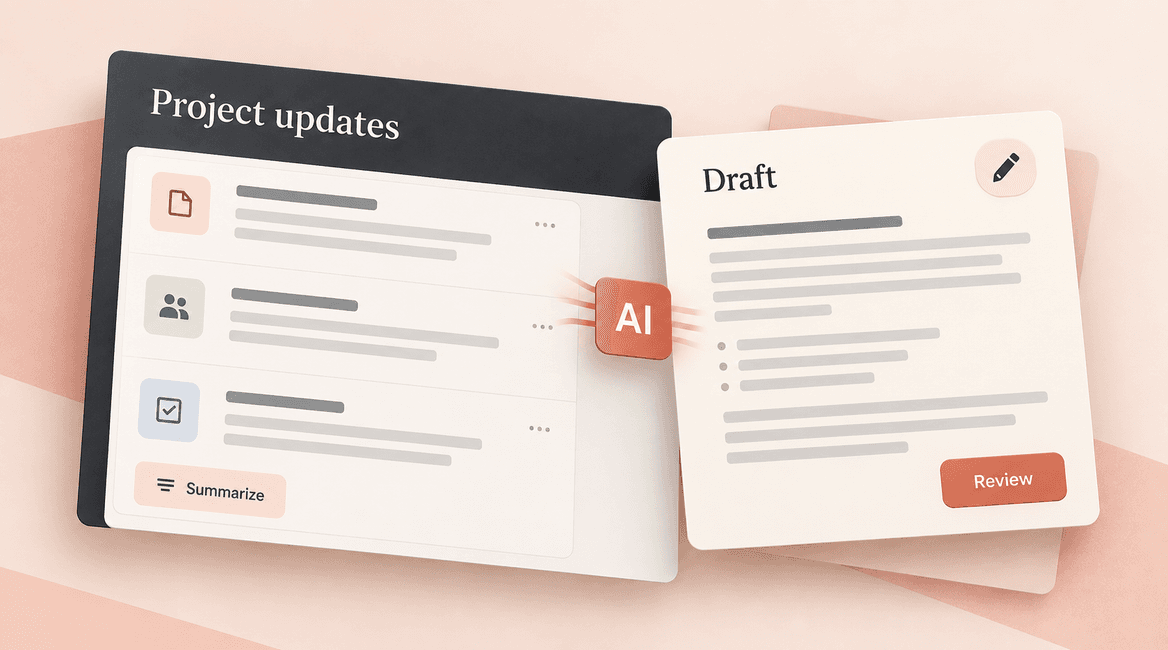
This guide follows a hypothetical project-management app adding a “Draft status summary” action. A project owner selects recent updates, receives an editable summary, and decides whether to save it. The same architecture applies to many AI integration projects, with additional checks for higher-impact actions.
Give the model a bounded task. Keep the rules that protect your application in the application.

Choose one AI feature with a measurable outcome
Define the job and the fallback
Start with a repeated task where imperfect output can be inspected or corrected. In our example, the goal is to reduce the time spent assembling weekly project summaries while preserving blockers, dates, and unresolved decisions. The baseline is the current manual workflow, measured on representative projects.
Write down what the feature may do: summarize selected updates and identify unanswered questions. Then define what it may not do: change deadlines, mark work complete, invent commitments, or publish a report. If the model is unavailable, users can still read the source updates and write their own summary. This makes the feature useful without making the entire product depend on it.
Put the model call behind your backend
The browser submits the project identifier, selected update identifiers, and a request identifier. The backend authenticates the user, checks access to the project, loads the authorized records, and constructs the model request. Keep provider credentials out of browser code and mobile application bundles.
Never trust a client-supplied workspace identifier as proof of permission. Load records through the same authorization rules used elsewhere in the app. Sending a forbidden record to a model is already a disclosure, even if a later response filter hides it from the user.
Send the minimum context needed for the task. A status summary may need update text, authors' display names, and dates; it rarely needs billing details, private attachments, or every historical conversation. Review provider data retention, deployment region, and contractual settings against the actual data you plan to send. Do not assume every API account has the same configuration.
Give inputs and outputs an explicit contract
Define the output your interface needs before writing the prompt. For the summary feature, that could be an overview, a list of blockers with source update identifiers, and a list of unresolved questions. Allow empty values where information is absent instead of encouraging the model to fill every field.
Providers may support structured outputs constrained by a schema. This can help your application parse results consistently. It does not establish whether a deadline is accurate or a referenced record belongs to this project. Check those facts in your own code.
For example, reject a source identifier that was not in the authorized input set. Flag a reported deadline that cannot be traced to a source update. Require numeric values to pass domain rules, not just a numeric type check. Keep the distinction between “valid format” and “acceptable result” visible in your implementation and tests.
Decide what to do with incomplete or incorrect results
An output can be syntactically valid and still omit the most important blocker. Show the draft alongside links to the source updates so a user can review it efficiently. Label generated content as a draft, preserve edits, and make the save action explicit.
If validation fails, choose a bounded response: return a useful error, ask the model for one repair attempt, or offer the manual workflow. Avoid unlimited retry loops that quietly consume money. A repair prompt should describe the specific validation failure without adding unrelated confidential context.
Design for slow responses and failures
Choose between a synchronous request and a background job based on typical duration, payload size, and the user's workflow. A short summary might finish while the user waits; processing a collection of long documents may need a queued job with visible status. Measure real requests before deciding.
For a background job, store a request identifier, owner, status, input version, timestamps, and result or failure reason. The interface should distinguish waiting, running, failed, and complete. Refreshing the page should reconnect to the same job rather than create a new one. Set a maximum processing duration and a clear recovery path.
Retry temporary failures selectively with a limit and delay. A retry can cause another model charge even if your app ultimately stores only one result. Use idempotency in your own job creation and save operations, and verify any provider-specific guarantees separately. Do not assume that sending an arbitrary idempotency header makes model calls free of duplication.
Keep generated drafts separate from saved records
The AI response should not overwrite the user's current work as soon as it arrives. Store it as a candidate associated with the input version. If the underlying project updates change during generation, indicate that the draft may be outdated and let the user refresh it.
Use a version check when saving so a late AI response cannot erase a more recent human edit. In the example app, saving the summary changes only the summary record; it does not close tasks or alter due dates. Adding those actions later requires separate permission checks and explicit product decisions.
Instrument the feature without logging everything
Record request duration, model and prompt version, outcome, validation errors, and usage needed for cost monitoring. Use a correlation identifier to connect a browser error to a backend job. Keep sensitive content out of routine logs; define retention and access for any samples retained for quality review.
Review cost per accepted summary, edit burden, failure rate, and time saved against the manual baseline. Acceptance alone can be misleading if users save drafts with major errors. Periodically inspect a sample with the people who understand the source material.
Test the workflow at its boundaries
Use fixed test inputs and expected behaviors, not an assertion that every output must match one exact paragraph. Separate deterministic application tests from quality evaluations of model responses. The former check permissions and state transitions; the latter check completeness, grounding, and usefulness.
- A user selects an update from another workspace: the server refuses access before a model call.
- A user clicks the action twice: the interface and backend reuse or deliberately distinguish requests, rather than silently launching duplicate work.
- The provider times out: the job has a recoverable failure state and the manual workflow remains available.
- The model references an unknown update: validation rejects or flags the result.
- Source text asks the assistant to reveal secrets: it cannot expand the request's permissions or access credentials.
- A human edits the summary during generation: the arriving draft does not overwrite that edit.
Before you launch: a practical checklist
- The feature has a narrow outcome, manual baseline, and fallback path.
- Authorization runs before source data is loaded or sent to a provider.
- The output contract includes missing-data behavior and semantic validation.
- Long-running work has persistent status, time limits, and bounded retries.
- Duplicate requests and late results cannot overwrite user work.
- Generated results remain reviewable until an authorized user saves or acts.
- Usage, quality, latency, and cost are measurable by feature version.
- A feature flag can disable generation without disabling the original workflow.
Roll out to a small group first
Start with an internal or opt-in group that understands the feature's limitations. Review failures on the same kinds of projects that will use it in production. A demo using short, clean updates does not predict behavior on months of contradictory notes.
Decide launch criteria before expanding access. These could include no unauthorized source access in the security tests, no lost edits in concurrency tests, and an agreed quality threshold on representative summaries. Choose thresholds appropriate to the task rather than borrowing a universal accuracy number.
Keep the prompt, model selection, retrieval settings, and validation logic versioned. Re-run the evaluation set when any of them changes. A provider upgrade may improve general capability while changing the exact behavior your workflow relies on.
When the next step is retrieval or fine-tuning
If the feature needs information outside the selected records, add a permission-aware retrieval step or a deterministic data lookup. If failures persist because the model repeatedly misunderstands a stable specialized task, investigate better examples and possibly fine-tuning. Our RAG versus fine-tuning guide separates these failure modes.
You do not need a provider abstraction for every theoretical future model. A small boundary around request construction, response parsing, and error handling is often enough to keep your business logic independent of one SDK. Add complexity when a real requirement justifies it.
FAQs
Can AI be added without rebuilding the app?
Often, yes. A narrow feature can use the existing interface, backend, authentication, and database. The main work is understanding the workflow and adding reliable boundaries around the model. If the existing app cannot enforce data access consistently, address that weakness before exposing records to a new integration.
Should the AI feature run directly in the browser?
A hosted model using a private API credential should normally be called through your backend. On-device models are another architecture with different capability, device, and distribution constraints. They do not remove the need to validate important outputs.
Can generated content trigger an action automatically?
It can be designed that way, but start by separating generation from execution. Validate the proposed action, check the user's authority, and require confirmation where a mistake has meaningful consequences. A generated suggestion should not become permission to send, delete, purchase, or modify records.
What should an implementation proposal include?
Ask for the user flow, data boundary, output contract, failure behavior, evaluation plan, and operating-cost estimate. Discuss an AI integration with DevConex using one real workflow and a few representative examples as the starting point.